
A LITTLE LESS ADMIN. A LOT MORE POSSIBILITY.
A self-hosted web GUI
for managing Linux servers, Docker containers, apps, files, services and backups.
Turn your Linux server into a place that feels like home. Apps, files, AI and everything in between. In one beautiful browser desktop.
Open source. Self-hosted. Entirely yours.
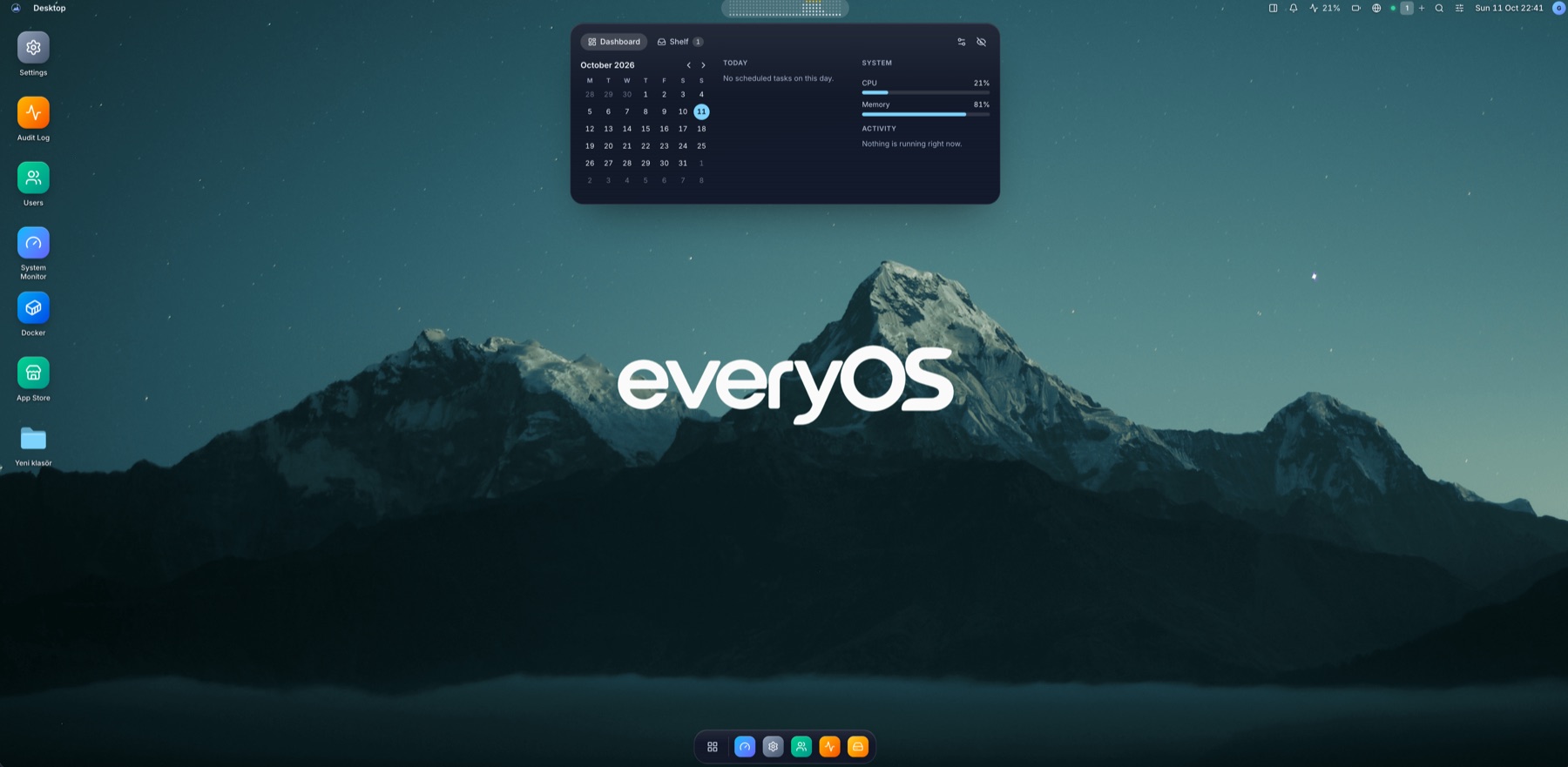
ONE DESKTOP. ALL YOUR POSSIBILITIES.
Everything in its place.
You, in control.
A familiar workspace for the things you love to self-host. No more jumping between dashboards.
Files, without the friction.
Your own home folders, USB disks and connected Google Drive. Browse, preview and move files in one place.
A clear view of your server.
CPU, memory, storage, services and a real Linux terminal. The details you need, always within reach.
A little more peace of mind.
Verified updates, private accounts and encrypted off-site backups. Practical controls for your own workspace.
MORE OF YOUR SERVER, IN ONE PLACE.
The rest of your workflow. Connected.
Your smart home, maintenance, storage and tools belong in the same workspace. Explore what else EveryOS brings together.
Your home, connected
Rooms, devices, live states and supported Home Assistant controls.
A desktop that stays useful
Personal themes, live widgets and the Pulse shelf.
Maintenance on your schedule
Schedule supported updates, restarts and backups.
Updates that reach you
In-app alerts, ntfy, Telegram, e-mail and webhooks.
A real Linux shell
Linked Linux accounts, real permissions and independent terminals.
Updates and power, together
Signed EveryOS updates, APT packages, restart and shutdown.
Your Drive, in Files
Connect your own Google account and copy files both ways.
Plug in. Move on.
USB mounting, safe ejection and visible transfer progress.
Apps made for your desktop
29 official apps, signed packages and declared capabilities.
Build something of your own
A standalone SDK, app widgets, registries and documented APIs.
See what is happening
Processes, network, hardware health, services and live logs.
FROM SERVER TO WORKSPACE.
One command.
A whole new perspective.
Install EveryOS on your existing Linux machine. The runtime is included. Your browser does the rest.
- 01
Check your host
Debian 12+, Ubuntu 22.04+ or a compatible APT/systemd host. ARM64 or AMD64.
- 02
Run the installer
Run the command on a fresh Linux host, then read your one-time setup token.
- 03
Make yourself at home
Open the address printed by the installer and create your administrator account.
curl -fsSL https://github.com/goktugcy/everyos/releases/latest/download/install.sh | sudo bashThen read your setup token
sudo cat /var/lib/everyos/setup-tokenDocker is installed separately for container apps. Already using EveryOS? Update from Settings → About.
A CLEAR PATH, EVERY STEP.
Less guesswork.
More getting things done.
From your first install to your next backup. Find the right guide and keep moving.
Browse all documentationGood questions.
Clear answers.
Is EveryOS an operating system?
EveryOS is a web-based management desktop on your existing Linux installation. It is not a bootable distribution or a remote desktop video stream.
What hardware can I use?
A 64-bit ARM64 or AMD64 machine running Debian 12+, Ubuntu 22.04+ or a compatible APT/systemd distribution. Compatible Raspberry Pi systems are supported too.
Do I need Docker?
Docker is required for container apps and managed AI installations. Install Docker separately; the EveryOS installer does not install it.
Can I use it away from home?
Yes. Configure Tailscale Serve or an HTTPS reverse proxy. Tailscale is optional and must be installed separately.
Is EveryOS free and open source?
Yes. EveryOS is released under the MIT License. Explore the code, report an issue or contribute on GitHub.